
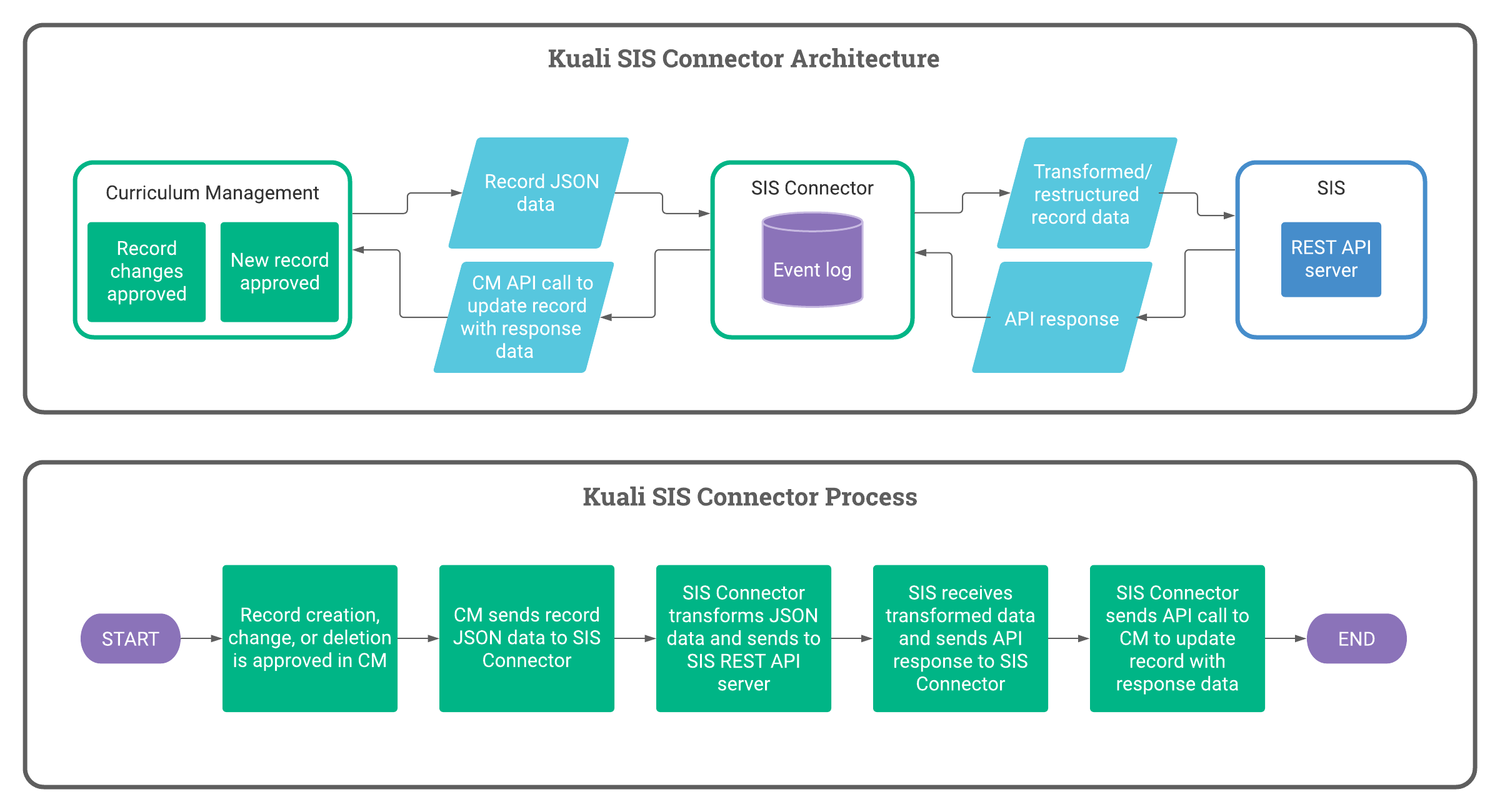
What is the SIS Connector?
Kuali supports data exchange between Curriculum Management (CM) and your SIS (or a third party application) via the SIS Connector. Built and supported by the Kuali team, the SIS Connector keeps your SIS up to date with the latest curriculum changes as they are approved in CM.
What is required to set up the SIS Connector?
An API endpoint must be configured on your SIS. This endpoint must be able to consume, parse, respond, and then post the Kuali data into the respective fields in your SIS. If an API endpoint cannot be configured due to system or resource constraints, this integration cannot be supported by the Kuali team.
How does the SIS Connector authenticate against my application?
Kuali supports two authentication methods for the SIS Connector:
- Standard username and password
- Login endpoint credential
If needed, the Kuali team is able to configure a static IP address for the integration at request.
What data is synced between CM and my SIS?
Data syncing from CM to your SIS is configurable. During setup, your team will work with a Kuali Customer Success Engineer to complete the SIS Connector Crosswalk file. This crosswalk file outlines how the SIS Connector should transform CM data into the format your application requires. Required fields for the crosswalk file are as follows:
- Kuali API Key
- Kuali Label
- Application Field
- Transformation
- Example
- Notes
Without filling out the crosswalk, raw CM data will be passed to your application and you may choose to control the transformations yourself.
The following fields are synced by default:
- Code/Subject Code and Number
- Title
- Description
- Groups (Department, College, etc.)
- Credits
Any fields outside of this list must be scoped to determine if additional services are required.
We can also sync back an application unique identifier to CM. After syncing, this application unique identifier can be displayed on the CM record to all users, admins only, or you may choose not to display the application unique identifier in CM at all.
An example crosswalk file can be found here. Remember, your Crosswalk file may differ from this example depending on your CM forms and application requirements.
What triggers a sync?
By default, syncs are triggered by CM events exclusively (note: you cannot trigger a SIS Connector sync from your application). Three CM events will trigger a sync:
- Proposal approval via an admin or workflow completion
- Admin edits
- Record deletions
We understand that many institutions want to control the timing of record creations and updates in their application. Therefore, we have alternate options to syncing on live CM events:
- Pausing: the real time syncing of the SIS Connector can be toggled on and off by a CM admin. Changes made in CM will not sync to your application until the the SIS Connector is toggled on.
- Bulk syncing: records to sync in bulk can be designated using filters. For example, you may want to sync changes based solely on a specific field in your form; therefore, bulk syncing can be configured to send changes that meet the criteria outlined for that field. Bulk syncing can be used in tandem with live event syncing. Bulk syncing can be access via the API but you must coordinate your sync schedule with a Kuali Customer Success Engineer.
Does the SIS Connector track successes/failures for syncs? And will it retry a sync if it has failed?
The SIS Connector will track and log responses from attempted syncs. Logs for SIS Connector syncs can be given at request (contact your Kuali Customer Success Manager or the Kuali Support team). The SIS Connector will respond to each of the following responses as listed below:
- HTTP 200 response: the SIS Connector will log the sync as successful.
- HTTP 400 error: the SIS Connector will assume there is something wrong with the format of the data and will not attempt to retry the sync.
- HTTP 500 error: the SIS Connector will assume the application endpoint is unavailable and mark the sync for retry.
- By default, retries are made every two hours. This can be customized, but it must be a specified cadence. In other words, there is not yet exponential retries for the SIS Connector. The max attempts the SIS Connector will retry is ten (10).
For more information, please contact your Kuali Customer Success Manager or the Kuali Support team.
Comments
0 comments
Please sign in to leave a comment.