
The setting within Date Formats will allow you to determine how dates will appear across your system. You may choose between one of the defined formats within the drop-down menu, or you can select Custom and provide a format.
This applies to how dates appear in various fields or menus - such as the 'Created On' field within item types (Courses, Programs, etc) or within the date picker gadget on forms.
Note: The Audit Log will display the date in the format of MM/DD/YYYY followed by a time stamp and the format can not be changed in this case. This is due to the addition of the time stamp for this display and how the data is structured to allow this to display the time based on your location. 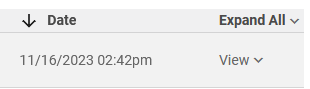
The default setting for dates across CM will be YYYY/MM/DD. If you would like to change the format, use the drop down menu to select a new option. The setting will be updated automatically and reflect across the system.
Note: Date Formats may be modified by Admins or CM Admins by default, or a user within a role that has been granted permissions to manage them.
Comments
0 comments
Please sign in to leave a comment.